
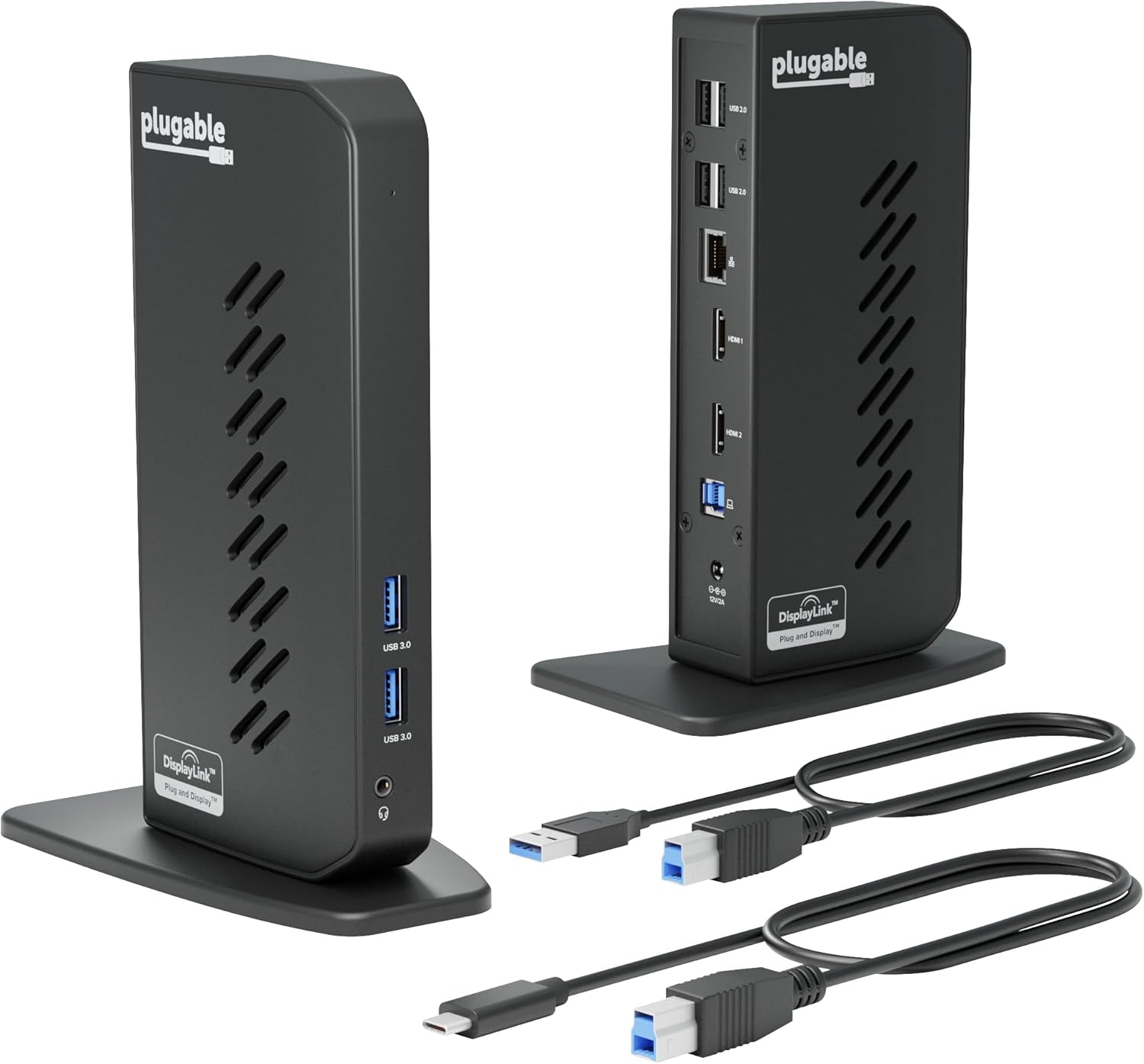
Plugable USB 3.0 and USB-C Universal Laptop Docking Station with 2 HDMI Ports for Windows, Mac (Driver Required), and ChromeOS, Gigabit Ethernet, Audio
$99.95
Related Products






From the brand



Find Your Docking Station
Shop for Mac
Shop for Windows
Shop Universal Compatability

Shop for Business
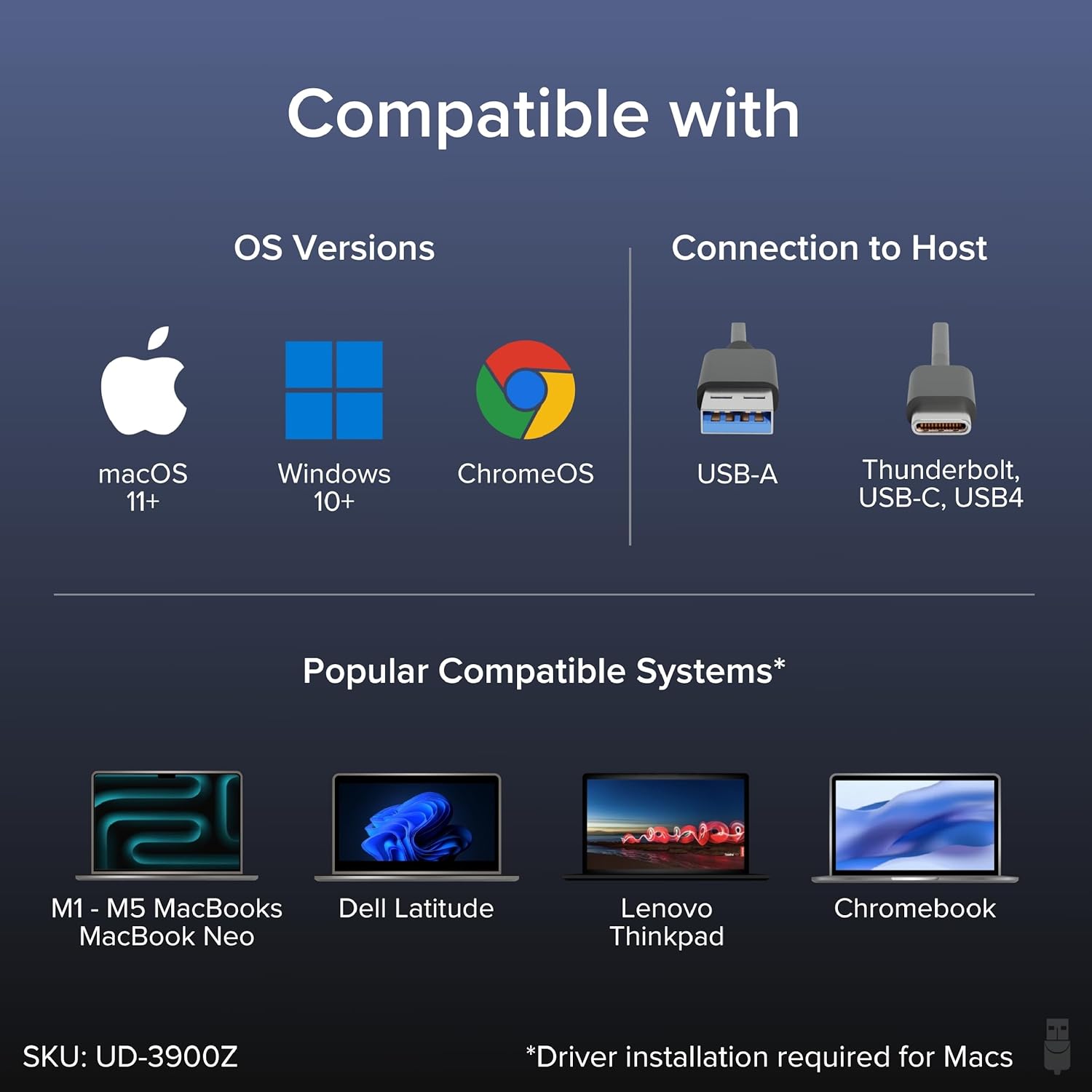
Standardize Dual-Monitor Workstations: This laptop docking station enables dual HDMI displays up to 1920×1200 from a single USB connection. Supports M1 to M5 MacBooks and MacBook Neo, and expands multi-monitor support on M1-M3 and Neo systems normally limited to one external display. A practical solution for organizations standardizing workstations across mixed device fleets. Does not charge laptops.
Designed for Windows, macOS, and ChromeOS environments. Windows installs drivers automatically via Windows Update, macOS requires DisplayLink software installation for external displays, and ChromeOS works without additional setup. Ideal for IT-managed deployments across multiple operating systems.
10 Ports with USB-C or USB-A Host Connectivity: Includes two HDMI ports, two 5Gbps USB ports, four USB 2.0 ports, Gigabit Ethernet, and a 3.5mm audio jack. Both USB-C and USB-A host cables are included, allowing compatibility with newer and older laptops while the compact vertical design helps reduce desk clutter.
Best Suited for Office & Productivity Use: Optimized for business software, web applications, and everyday productivity workflows. Does not support HDCP, so encrypted or copy-protected content such as Netflix or Hulu will not play. Not recommended for gaming or full-screen video playback. DisplayPort monitors not supported.
Expert Lifetime Support: Backed by North American-based technical support and our compatibility guarantee if something doesn’t work, we’ll make it right. Trusted by IT professionals worldwide, Plugable provides direct access to the engineers who design our products for deployment assistance, troubleshooting, and lifecycle support. We resolve issues quickly to minimize downtime and help organizations maintain productivity at scale.
13 reviews for Plugable USB 3.0 and USB-C Universal Laptop Docking Station with 2 HDMI Ports for Windows, Mac (Driver Required), and ChromeOS, Gigabit Ethernet, Audio
Add a review
$99.95
Donna Oliver –
Grate customer support
I got a plugable docking station 1 year ago and it was easy to setup and worked wonderfulThen a year later it stopped working not to worry plugable has a two year warranty.I emailed them and the next day I got a replay asking me to run a test and send it to themI didI needed the docking station now so I ordered one from amazon got it the next day set it up andagain it worked just fineI thought that plugable would send me another one i told Michael that I had a new one already and could he just send me a refund he said no problemMichael was my service rep and was fantastic at his job he said that the test showed a bad unitand that he would get me a refund it might take a couple of days to show on my credit cardIt was on my card the next dayThe docking station is fantastic and the customer service it better
Lavalchiefs –
DisplayLink over USB-C
Works perfect. Easy to install, good price. This allows me to have multiple monitors even though my Laptop’s USB-C port doesn’t support DisplayPort nor Thunderbolt. This adapter uses DisplayLink technology to make it work. Fast and great resolution. No extra software required, it uses standard DisplayLink drivers from Microsoft.
John M. –
Works great
Great product. Made setting up dual monitors a breeze. Product is a great size and doesn’t take up much space at all. Provides great quality resolution. Works well with my older laptop.
Brian –
Great product! Just what I needed to accommodate PC laptop & MacBook Pro
Great product and relatively easy to use. Meets my functionality needs to work with PCs and MacBooks, support for 2 HDMI monitors, and devices requiring USB ports. For PC it’s easy. No addition software needed. For MacBooks, you need to download and install the appropriate DisplayLink driver for your version of MacOS. It’s a free driver, and only takes a minute or 2 to install. Nice build. The description of this product said it does not supply power to charge host PC. So I can’t take any stars away for that. I don’t believe there are any docking stations that charge the host pc at this price point. Gotta spend close to double for that feature.
Kenn23 –
Great docking station
Easy to setup! Small footprint, works as described so far.
Grant –
Only one dock
Picture of this item is a little misleading as it shows two docks and I couldn’t find where it stated only one…..I figured it was only one but was hoping to be suprised and find two…. There is only one, but its super easy to setup and works well.Plus it has a two year warranty that comes from the manufacturer, so that is nice.My last dock was by the same manufacturer and is almost 11 years old and just started to have the screen flash on and off. They make good docks that last.
geodan06 –
Late Review
This is a late review on the Plugable USB 3.0/USB-C docking station.Have had this for about 4 years, originally connected to a Dell Insprion with the standard (old?) USB cable. Upgraded to a Dell Vostra 5620 about a year ago and thought I would need a new docking station since the new Dell had a USB-C port and not the older regular USB 3.0 port. Remembered the docking station came with an extra USB-C cable and was able to find it. Got connected and was able complete my station setup and move forward.This week I started to experience some problems with the display of my extended monitor – an LG – which was connected via the docking station via one of the HDMI ports. Intially it was acting funny where everytime I attempted to move the mouse onto the extended monitor, it would go blank on my and few seconds later, it would come back. It kept on doing that and I was unable to use the monitor. Had experienced similar issues previously but not to that extent. Decided to restart my computer, hoping that would clear up the issue. Well that didn’t work and I could no longer access my extended monitor – kept saying it didn’t have a connection. Did a quick Google search and didn’t find any solutions but did see an issue where they had a HDMI port issue and were told to reach out to Plugable Support, which I did.They were quick to respond back and asked for the order # and had me load an app to generate a log file for them to review. In the meantime, since I needed to continue working, I plug the HDMI cable from the monitor directly to the computer. Once I got the email response from Support, I replugged the HDMI port back to the docking station and low and behold, the monitor was working. I still ran the debugging tool they recommended and sent them the file. About an hour later, they responded that the issue may be with the DisplayLink driver – it was “a little outdated”. I followed there instructions for updating the driver and have not had an issue again.5 stars for the docking station not previously causing any problems5 stars for including an extra USB-C cable with the docking station5 stars for Support working with me to solve the problem and being very responsive.Thanks Plugable! Will not hesitate purchasing your products in the future!
Imported-from-Singapore –
Great powered hub for multiple peripherals, ethernet and hdmi.
Needed a hub for multiple peripherals as well as an ethernet connection for faster connection. Searched for a bunch of options from Anker, Belkin etc, but this product provided a great solution and price. Another consideration is I wanted it stand alone powered … and not PD. This product met that requirement as well … and you can connect to your laptop/device either through USB-C or A, both cables are provided. Very nice.
cxm238 –
Have had this docking station only a few days, so I can’t speak on its longevity. However, I found it extraordinarily easy to set up. It worked perfectly to run an external camera, external microphone, external keyboard, and two monitors when connected to my laptop—even though the laptop does not have a “power” C slot. I had tried a different (and twice as expensive) docking station first, and it simply wouldn’t work with the monitors.
GUSTAVO MONROY NAVARRO –
Excelente! Su función permite sincronizar los dos monitores sin mayor problema.
Michelle –
Wish I would have found this dock earlier. Worked like a charm, literally Plug & Play. No hassle.
JK –
Turned my M2 mac pro into a 3 display unit.Compatible with a wide array of monitors. I’m using a a Dell 24″ and a acer gaming monitor. works totally fine..
A. Forest –
(NOTE: I’ve only had this product for a few days, so not comment on the longevity)For my work, I need to have multiple windows open, and my MacBook Air (M2) wasn’t cutting it. I bought a 27-inch BenQ monitor, but it wasn’t enough, so I got this to add another monitor (a 21-inch Asus) that was just sitting around.Set up 1: You go to their website and download and execute the driver. Very easy.Set up 2: You connect the dock to your laptop (USB C for me), then to the monitors (HDMI-HDMI for me). HDMI cables were NOT provided.Set up 3: Go to your Mac preferences and arrange the screens the way you like them. That’s it. Just make sure that you have the screen recording permitted, otherwise it doesn’t work.Con 1: It DOES NOT charge your laptop or monitors, so you’ll need to power two monitors and the laptop all separately (i.e., you need a big power bar). A LOT of cables everywhere, and it’s a bit inconvenient.Con 2: For Mac OS users, HDCP won’t work. So technically, no streaming services (just audio and no visual). However, I contacted them and they showed me a way around it.Overall, I’m very happy with everything.Price: ReasonableEase: Very easy to set up and usePerformance: GoodLongevity: Don’t know yet.Customer service: GreatRecommend: Highly