

acer Wireless Gaming Mouse for Laptop, 24,000 DPI Wired Computer Mouse with 8 Programmable Buttons, Left & Right Hand, Rechargable Gaming Mice, Long Battery Life, RGB Lighting Gamer for PC, Desktop
$25.99
Related Products










Product description


1 Rapid Accuracy
2 Adjustable DPI
3 Full Customization
4 9 Vivid Lighting


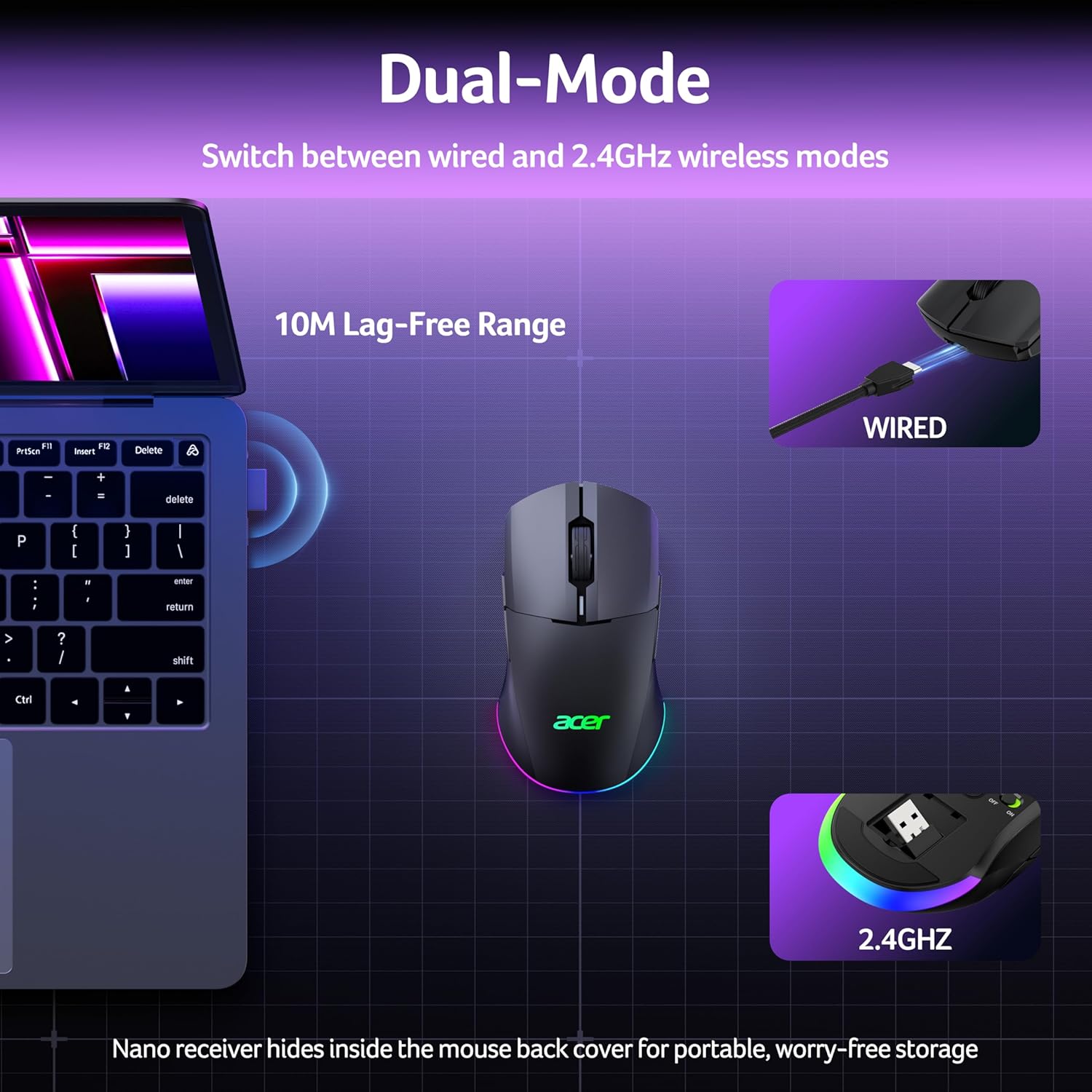
1 Dual Mode
2 Smart Sleep
3 Quick Recharge


1 Gaming At Fullest
2 Boost Work Efficiency
3 Edit Epic Highlights
4 About Us
Why is the RGB off by default? To save battery, the mouse’s RGB lights are off during use and only turn on when idle. You can disable this feature through the driver software. How do I change / close RGB? Hold the front side button and press the scroll wheel to cycles 9 modes → RGB off → repeat. The default mode is Wave (mode 6). You can also adjust colors, brightness, and effects in the driver. How do I reset the mouse? Press and hold Left Button + Right Button + Front Side Button + Back Button for 3 seconds. The lights will flash three times to confirm. Can I charge while using it? Yes, just switch to wired mode to charge and continue using the mouse. No need to wait for a full charge to resume play. How to toggle side buttons? Press and hold Front Side Button + Back Button for 3 seconds to toggle the side buttons on or off, preventing accidental clicks. Sleep time too short? The mouse features dual sleep modes to balance power saving and responsiveness—light sleep after 30 seconds and deep sleep after 180 seconds. Wake by move or click. Timer adjustable 1–9 min via driver.
【24K High-Precision Gaming Sensor】Equipped with a high-performance optical sensor with 24,000 DPI, 1000Hz polling rate, and 35G acceleration, this wireless gaming mouse delivers fast, consistent tracking for accurate aim and smooth control. Switch between 6 DPI levels for quick flicks, micro-adjustments, and precise targeting in FPS or everyday tasks. 📌Note: Default DPI and each level’s value can be customized in the driver (max 24000, min 1200, default 2400).
【Advanced Programmable Buttons】Take control with 8 programmable buttons and full macro editing via the driver. Remap commands, assign complex macros, and fine-tune DPI settings on this computer gaming mouse. Dedicated Forward and Back side buttons help execute faster in-game actions in FPS battles, MOBA team fights, or everyday navigation. 📌Note: Click “Apply” to save changes. For driver download and installation, refer to the Installation Manual (PDF).
【Pro-Grade Player-Ready Mouse】Comfort Switch between high-speed USB-A wired mode and stable 2.4GHz wireless for flexible gameplay. The symmetrical ergonomic shape supports both left- and right-handed users, making it a great left handed gaming mouse option while maintaining a natural, comfortable grip for extended gaming or work sessions. 📌Note: USB-A receiver is stored under the back cover. This mouse supports 2.4GHz wireless + wired connection and does not support Bluetooth.
【Dynamic RGB Lighting】Enhance your setup with 9 dynamic RGB lighting modes and 16.8M color effects on this RGB wireless mouse. Adjust brightness, speed, and lighting styles in the driver to match your gaming atmosphere, desk setup, or personal style. 📌 Note: RGB auto-off can be toggled in the driver. Lighting modes can also be switched by holding the front side button while scrolling.
【Built for All-Day Gaming】The 650mAh rechargeable battery delivers up to 40 hours of playtime. You can also play it continuously as a wired gaming mouse while charging, so gameplay never stops. Smart power management automatically enters sleep to help extend battery life. 📌 Note: Light sleep wakes on movement; deep sleep on click. Sleep mode cannot be disabled. Idle timer adjustable (1–9 min) in driver.
13 reviews for acer Wireless Gaming Mouse for Laptop, 24,000 DPI Wired Computer Mouse with 8 Programmable Buttons, Left & Right Hand, Rechargable Gaming Mice, Long Battery Life, RGB Lighting Gamer for PC, Desktop
Add a review
$25.99
Joseph –
Quality
It works exactly as said! I could not be any happier!
MXM –
Great mouse for the price..
Night and day difference from my conventional HP mouse. Sometimes a little to sensitive… I’m using it ‘wired’ and NOT wireless.. I did have to go into some of my game settings and slow the mouse down. I am strictly using the mouse in Windows PC environment. No complaints..
Amazon Customer –
I like it.
I like it . Works well.
Project builder –
Decent mouse
This Acer wireless gaming mouse feels great to use and performs well overall. It’s very lightweight and glides smoothly across my mouse pad, which makes it comfortable for long sessions. I also like that it’s wireless, has a built-in power switch to save battery, and includes storage for the USB receiver in the bottom of the mouse.The variety of buttons is another plus. There are plenty to configure, and I like that the side buttons can be disabled if needed. The RGB lighting effects are also nice, with several different options to choose from.That said, there are a few things that could be improved. Changing the lighting effects is awkward, you have to hold the forward side button and click the scroll wheel, and you can’t even see the new effect until you release the button. It would be much better if clicking the wheel simply showed the current lighting mode right away.The manual is very bare-bones as well. I was able to figure things out, but better setup instructions would be helpful, especially for less technical users. The biggest frustration, though, was the software. The manual mentions downloadable drivers for DPI and lighting customization, but Acer’s US driver website would not load for me at all, even after trying from multiple devices.Battery status is another weak point. There is an LED, but it doesn’t clearly communicate how much charge is left, so there’s no way to know if you’re at 20% or 100%. The software might show this, but since I couldn’t access the drivers, I wasn’t able to check.Overall, the mouse itself is comfortable, responsive, and works well in day-to-day use. If the software access worked, the manual were more detailed, and the battery indicator were clearer, this would easily be a five-star product. As it stands, it’s a good mouse with a few frustrating usability issues.
Esther Taylor –
Perfect for those who are left handed.
This works perfectly for someone who is left handed!
Amazon Customer –
Do not but this product.
Trash. No drivers avaliable. Cannot program buttons or adjust lighting , wheel config, you have to enter your device serial number to be allowed to download their drivers. But this device dosent come back as valid. So im screwed. This isnt something I should have to deal with for basic setup or have to reach out to support for help on. Their restrictive driver practice is not user or consumer friendly. This device goes right back. Does not work as advertised.
Amami –
Very responsive
Decent mouse very responsive buttons.
enp6s0 –
A solid mouse that won’t disappoint, and that functions either wired or wirelessly
Overall this is a solid mouse and for $35-$40 at the time of writing I think it is a good deal. It is lightweight without feeling cheap, the body being made of a sort of matte plastic that has a nice texture. It has a clickable scroll wheel, as well as the forward/back buttons on both sides, with a dpi button on the bottom.My favorite thing about this mouse: It comes with the dongle stored securely inside the mouse, but it also comes with a very high quality usb cable. When attached to the computer, the mouse functions over the usb cable without the wireless dongle. This is fantastic and in my mind makes the mouse so much more versatile than a typical wireless mouse. You can lose the dongle and continue to use it as wired mouse, or be charging it while using it in wired mode.- Connection once the dongle was attached was instant, with no dropouts- It glides very nicely and I have no complaints about the overall operation of the mouse- The RGB colors are unique for this type and price range of mouse. I don’t fully understand how to control it, and it is always turning on and off when it is in wireless mode. Maybe when the mouse “sleeps”? So it does look a bit goofy at times. But in wired mode the lights stay on which I prefer.Overall I am very impressed by this mouse and I would not hesitate to recommend it. I love being able to use it in wired or wireless mode.
Javier Ramos –
Ratón bastante cómodo. Para jugar es perfecto. He estado jugando juegos online sin ningún problema.Las luces se apagan en cuanto mueves el ratón para ahorrar energía. No hace falta instalar drivers.Muy buen producto
csm101 –
Although marketed for gaming, this mouse is an excellent tool for office work. The ability to map buttons provides a significant productivity boost in a professional environment. Battery performance has been standout; I haven’t needed to charge it once in the several weeks since it arrived.The sensor accuracy is solid, and the wireless connection to the receiver remains perfectly stable. It strikes a good balance in terms of weight—neither too heavy nor too light—and the scroll wheel is impressively smooth. Overall, this is an easy-to-use, reliable, and highly functional mouse that handles every task without issue.
jean-marc Engelrelst –
Aucun soucis pour activer sa fonctionne très bien pas difficultés sans Fil
ivano –
Mouse leggero e preciso qualità prezzo ottimo
Carl –
I found the utility/drivers for the makes and models its in the download center on acergadget site and yeah it was a tough find but it’s there though no need for searching high and low thinking you got ripped off by not accessing your mouse’s full potential or customizations…