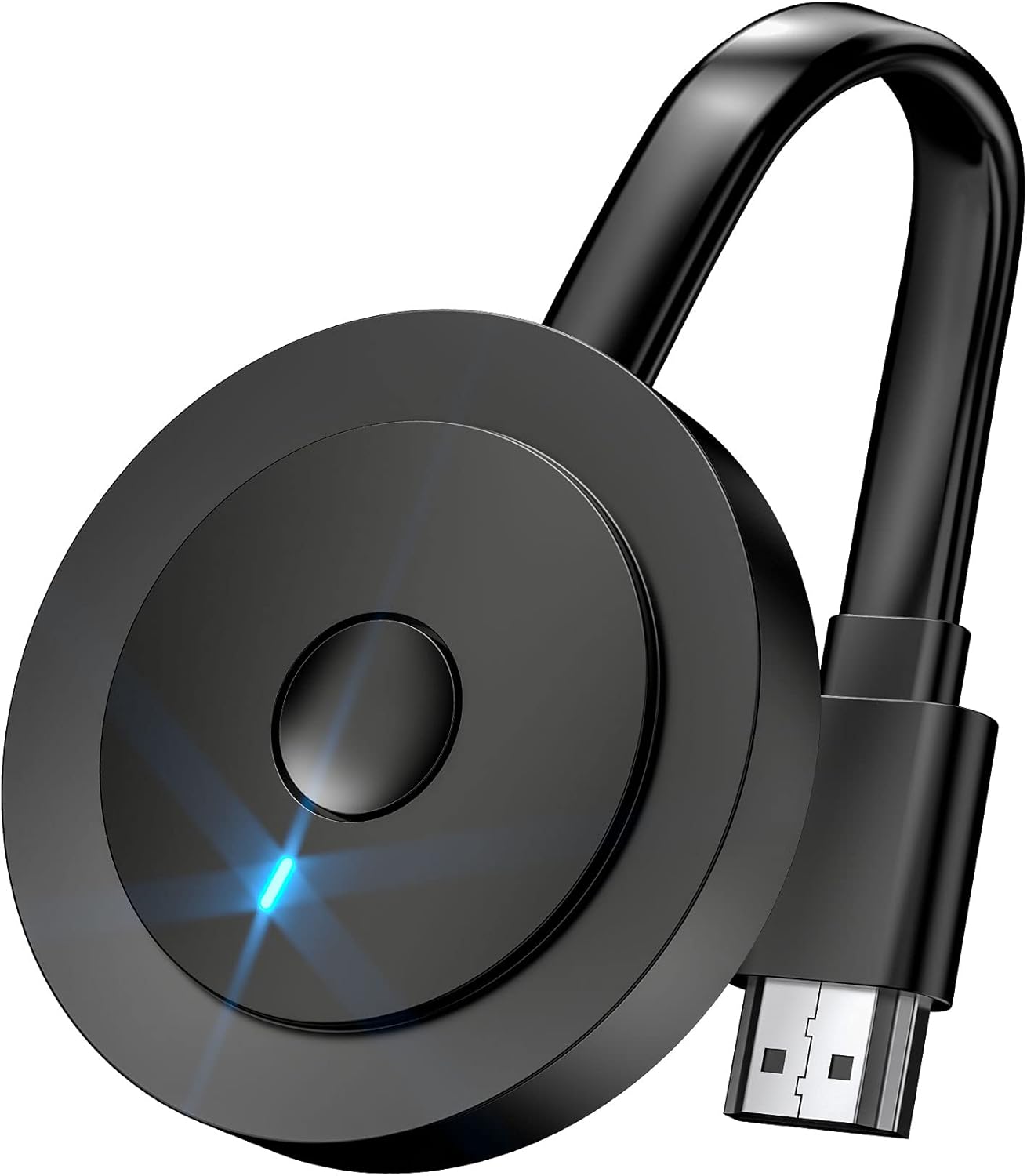
Wireless HDMI Adapter, DRYMOKINI 4K HDMI Dongle, Mirror Screen Display Dongle, Casting YouTube/TikTok from i-Phone,i-Pad, Android, Tablet, Windows to HDTV/Monitor/Projector, Miracast, Airplay, DLNA
$29.99
Related Products





From the brand


4K Wireless Display Adapter


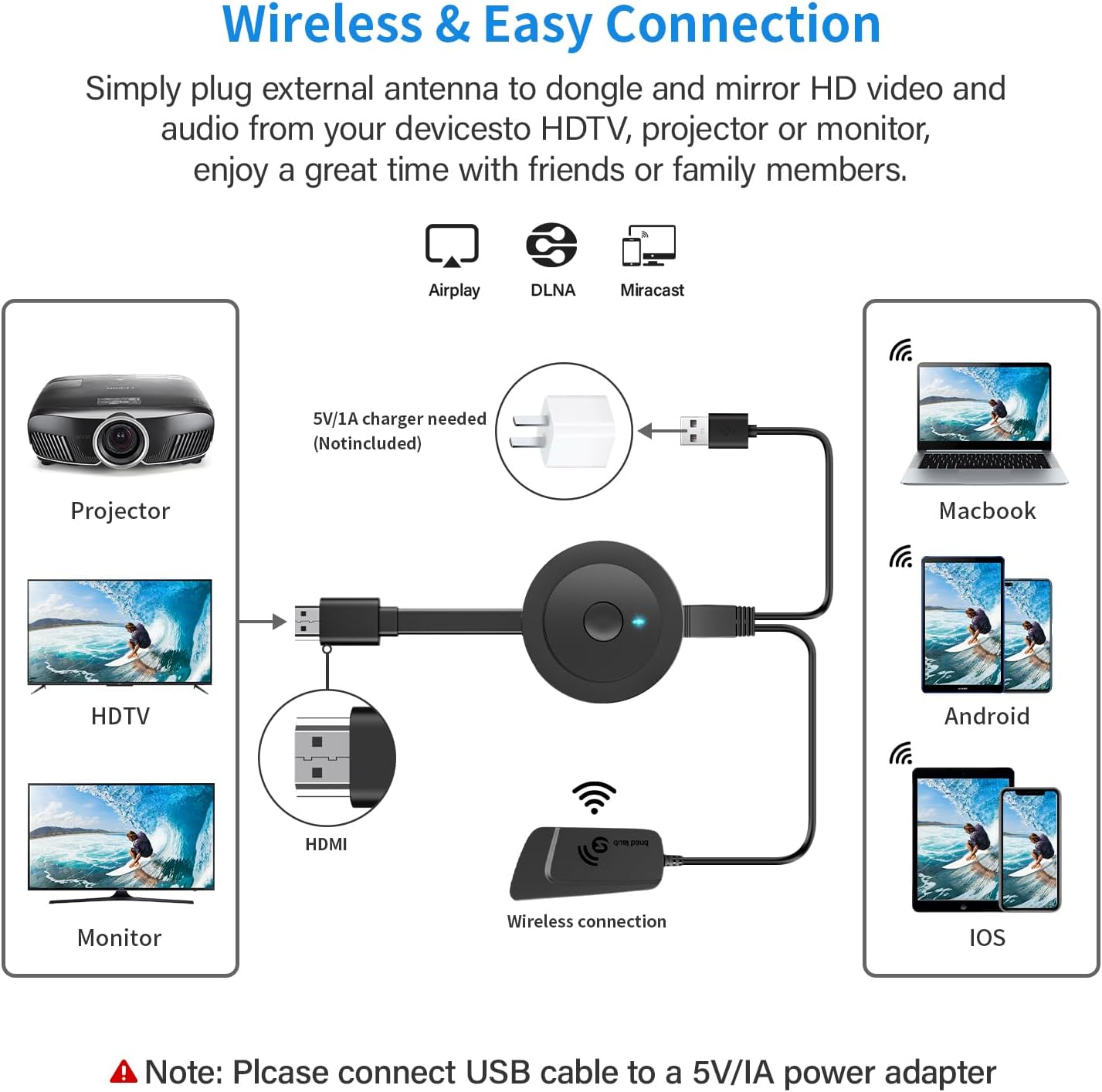
【ENJOY 4K ULTRA HD & HDR SCREEN】Drymokini wireless HDMI dongle delivers stunning 4K ultra-clear visuals, supporting resolutions up to 4K x 2K at 30Hz, 1080P at 60Hz, 1080P at 30Hz, and 3D/720P. Effortlessly sync your phone, laptop, or tablet to your TV, projector, or monitor for an immersive movie experience. Share unforgettable entertainment moments with family and friends.
【PLUG AND PLAY】With Drymokini wireless display adapter, enjoy a hassle-free setup. Just plug it in to TV and power it via your TV’s USB port. Activate the Miracast function on your device and select AMB-xxx—no additional settings, apps, or drivers required. Instantly start casting movies, presentations, and more for classrooms, meetings, hotel stays, and store showcases.
【FOR ANDROID & WINDOWS DEVICES】This wireless HDMI adapter is best for Android and Windows devices with support for encryption screen projection apps, you can enjoy seamless HD series, movies, and live sports from Netfix, Prime Video, Sky Go, BT Sport, Tiktok, Youtube, DIRECTV, HULU, Comcast TV, XFINITY, Vudu, Movistar and more.
【FOR IOS AND MAC OS DEVICES】 This wireless HDMI dongle can cast movies, photos, and music to a big display from free apps, such as Safari, Office apps, YouTube, WhatsApp, Skype, Twitter, Reddit, and more. Please note: A-pple devices are not compatible with HDCP apps like Neflix, Amazon Video, Sky Go, BT Sport, DIRECTV, HULU, Comcast TV, Xfinity, or other “HDCP” copyright-protected applications.
【MIRROR AND EXTEND MODE】DRYMOKINI wireless HDMI adapter supports mirror mode and extend mode. Under Mirror Mode, you can share the most luxurious video and audio with your friends or family members. With the Extend mode, the wireless HDMI display dongle allows you to cast video into the TV and play phone at the same time.
【Online Upgrade】Note: To optimize screen mirroring with your Go-ogle Pix-el Phone, please upgrading the dongle’s chip online for improved performance. Feel free to reach out to us for any assistance needed.
13 reviews for Wireless HDMI Adapter, DRYMOKINI 4K HDMI Dongle, Mirror Screen Display Dongle, Casting YouTube/TikTok from i-Phone,i-Pad, Android, Tablet, Windows to HDTV/Monitor/Projector, Miracast, Airplay, DLNA
Add a review
$29.99
Cycle Guy –
Good Cast Device
I tested this product on two mobile phones. It worked fine on the iphone 12 pro. However, after a day full of frustration trying to use it with my Jitterbug 3, I discovered from Lively.com that screen mirroring with these devices is not supported, though an android phone, apparently at the low end of the market, it does not have the hardware to mirror. This then is no fault to make against this product, most all other android phones should work fine with it.After a little effort, I was also able to get it to work with my Windows 10 desk top computer. It will cast to the SmartTV. At first, I had to reboot my Roku because the remote was frozen. However, once I learned to disconnect from the desk top first (be sure you are using duplicate screen with the wireless display), I could go back to the Roku HDMI channel and the remote worked fine.
Jason Turner –
Glitchy video
Adapter worked but even with mild action sceens the video was real glitchy and jerky, even on 2 different tv’s…. probably would be fine for pictures or such
Jatawn Kinzey –
Tv adapter.
As advertised.
P. A. Wilson –
OK screencasting phone to big screen. Unreliable for Win 10 Miracasting
Contacted support@aimibo.tv (listed on operator’s manual sheet) who suggested testing with Android phone, which worked very well. Got no help with Miracasting Windows devices with unreliable connection even with strong WiFi signal at a 2 foot distance. Recommend something else for miracast from Win 10 device.
RW –
Cheap. Poor picture.
Inexpensive device but has poor picture quality. Can’t imagine why it needs separate power while plugged to a powered port. Seems overly complicated for plug and play. More like plug, plug, plug and sort of play. My fault. I have a tendency to click on the inexpensive price sometimes without considering the quality of what I’ve just ordered. There’s a reason this product is so cheap.
Yuni –
Inalambrico
Super, lo recomiendo mucho
Kindle Customer –
Designed for Android 4.0 or less
Impossible for me to connect to. The DNS setup was no longer supported by my browser. The web site offered advice for Android 4.3… I’m running an older phone with Android 11. Two stars because it was a good idea… several Android versions ago.
Druid Of The Fang –
Does just what I need it to do
This is one of those rare cases where I am actually glad to be proven wrong about something. My initial review (which has been deleted) was extremely and unfairly negative based upon a misinterpretation on my part of the poorly written intructions. The way they were written seemed to jumble the set-up process between different devices not always clearly defining when they were refering to my Android. They also made reference to Wi-Fi settings when I think they meant Screen-Sharing. This made me think the device wasn’t working when it was. I was in the process of returning it when I received an eMail from the company with much clearer instructions for my Android and I was able to make it work. It was actually quite simple. After plugging in the HDMI and powering it up, go to Settings | Network | Screen Sharing and activate Screen Sharing. If you’re using your TV’s USB plug for power, make sure said TV’s power is on. Also make sure the TV is configured to receive input from the appropriate HDMI port. Connect to MiraScreen BF49BF9. This’ll take a minute or two and you might get a warning about a coflict between Wi-Fi and Bluetooth. This should do it. The TV should be mirroring your Android’s display. Screen-Sharing can always be turned off and your Android should remember this device the next time Screen-Sharing is activated.I use it all the time to watch stuff from the ABC and CBS apps (downloadable from Google Play for free) on my TV via my Android using my in-home wi-fi which is much, much cheaper than cable TV. I’m told I’ll be able to mirror live NFL games (go ‘hawks) on the Yahoo Sports App next season. I’ll update my review then.
Alicia –
No funciona
The Nomad –
This item is supposed to be 4k but it’s hd not 4k highest resolution is 1920 by 1080
Marco V. M –
Conexión fácil y compatible con todos los dispositivos, te facilita vida
Stef –
Déçu car obliger de se connecter et demande numéro de cb pour le fr fonctionner
Rodrigo –
It’s nice device, you can connect any device to the tv and it’s work perfectly fine. Easy to instal and to use it. I do recommend and also for the price, really good.Very pleased with it.